Airbnb Response Rate Guide
A plain English guide to Airbnb response rate, response time and the Superhost response rate. Built for short let hosts with 1 to 10 units who need fast replies without living in the inbox.

The short version
- Airbnb response rate is about whether counted new enquiries and reservation requests receive the right action within the required time.
- The standard listing metric looks at the past 30 days, while the Superhost response rate uses first replies over the past 12 months and is assessed quarterly.
- A decline can protect response rate when a request is not suitable, but an expired request can hurt it.
- Small hosts should aim for a 1 hour internal reply target because the Airbnb 24 hour rule leaves no room for sleep, travel or turnovers.
- Saved replies, clear escalation rules and an always on assistant reduce missed threads across Airbnb and direct booking channels.
Airbnb response rate is the percentage of counted guest enquiries and reservation requests you answer within the required window. For hosts with 1 to 10 units, the real problem is not knowing the definition, it is making sure no overnight enquiry, rule mismatch or same day request is left sitting until it becomes a late response.
Airbnb says response rate affects Superhost status and search placement, while response time mainly tells guests how quickly you usually reply, according to the Airbnb help article on response rate and response time. This guide explains the rules, the calculations and the operating system that keeps replies fast without tying you to your phone.
What Airbnb response rate means in plain English
Airbnb response rate means consistency. It measures the share of new guest enquiries and reservation requests where you respond in time, not whether you eventually have a nice conversation with the guest.
A guest reads a fast Airbnb host response rate as a trust signal. If they are booking flights, arranging parking or travelling with children, silence feels risky. For the host, it is a performance metric. Airbnb says the metric can affect Superhost status and search placement in its response rate help page.
Response rate is not the same as saying yes to every guest. It is not a measure of friendliness. It is not a requirement to keep chatting forever. The first counted response matters most.
For a 1 unit host, one missed enquiry can look unusually serious because there may only be a few counted threads in the past 30 days. For a 10 unit short let operator, the danger is different. More units usually means more channels, more cleaning days and more exceptions, so the miss often comes from process failure rather than laziness.
The safest target is not 24 hours, it is a useful first reply before the message can leave your working memory.
How Airbnb calculates response rate
The basic formula is simple.
Response rate equals on time counted responses divided by total counted new enquiries and reservation requests, multiplied by 100.
Airbnb describes the standard response rate as the percentage of new enquiries and reservation requests you responded to within 24 hours in the past 30 days, in its official calculation explanation. It also says a response can include accepting, pre approving, declining, sending a message or sending a special offer.
Here are sample calculations for small hosts:
| Counted messages | On time replies | Late or expired | Airbnb response rate | What it means |
|---|---|---|---|---|
| 5 | 5 | 0 | 100% | A quiet month stays perfect only if every thread is caught |
| 5 | 4 | 1 | 80% | One miss is enough to make the number look poor |
| 10 | 9 | 1 | 90% | You are at the common Superhost response threshold |
| 20 | 18 | 2 | 90% | Two misses still leave 90%, but there is no cushion |
| 20 | 19 | 1 | 95% | One save has a visible impact |
| 50 | 49 | 1 | 98% | Higher volume absorbs a single miss better |
| 50 | 45 | 5 | 90% | A weekend coverage gap can wipe out the buffer |
Quiet months are volatile. If you receive only 5 counted messages, one late first reply drops the example from 100% to 80%. That is why small hosts need a reply system even before they feel busy.
Response rate versus response time versus Superhost response rate
Airbnb response rate meaning gets muddled because three related metrics are often discussed together.
| Metric | What it measures | Window | Host action | Why it matters |
|---|---|---|---|---|
| Response rate | Counted new enquiries and reservation requests answered in time | Past 30 days for the standard listing metric | Message, accept, decline, pre approve or send a special offer where relevant | Airbnb says it affects Superhost status and search placement |
| Response time | Average time taken to answer new messages | Past 30 days | Reply as soon as possible | It shapes guest expectations before booking |
| Superhost response rate | First replies to each new host and guest message thread | Past 12 months, assessed quarterly | Keep first replies consistent across the year | Airbnb lists 90% as part of Superhost requirements |
Airbnb states that response time is the average amount of time taken to respond to new messages in the past 30 days, in the same help article. It also states that the Superhost response rate is calculated differently, using first replies to each new host and guest message thread over the past 12 months and assessed quarterly.
Airbnb’s Superhost requirements page says hosts need to respond to 90% of new messages and accept or decline new reservation requests within 24 hours. It also says Superhost performance is evaluated every 3 months over the past 12 months.
Operationally, aim for under 1 hour. The platform rule gives a deadline. Your business needs a safety margin.
What counts as a response on Airbnb
The key is to treat each new enquiry or reservation request as a task with a clear closing action.
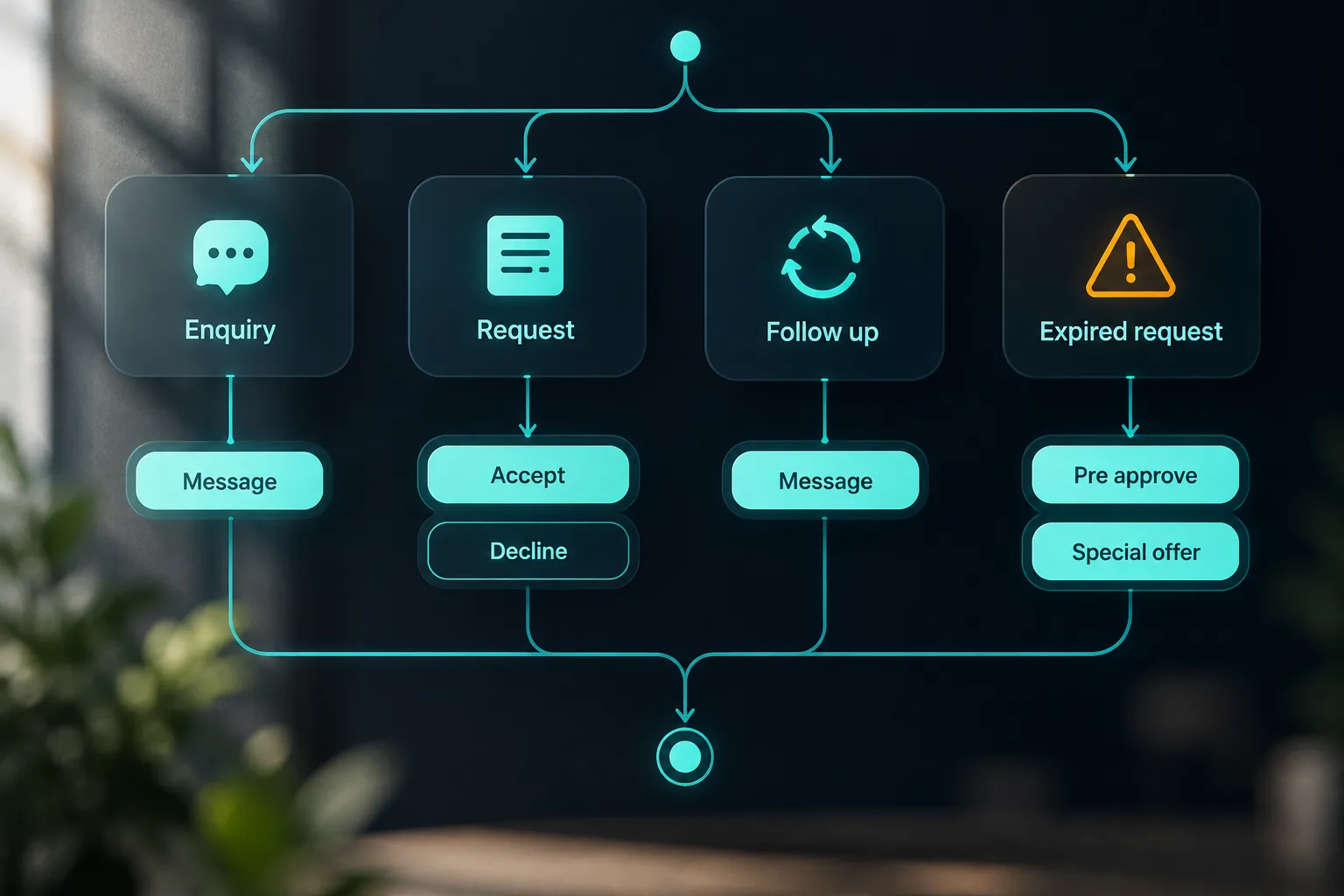
For a trip enquiry, Airbnb says you can respond within 24 hours by pre approving, sending a special offer, sending a message or declining if you cannot host, according to its help page on responding within 24 hours. For a home reservation request, Airbnb says accepting or declining counts as a response.
That means a decline can protect your airbnb host response rate. If the dates do not work, the guest count breaks your house rules or the stay is not suitable, do not leave it unanswered while you think about it.
Use this decision tree:
- Enquiry with a normal question: answer the question and invite the guest to book.
- Enquiry for unavailable dates: reply with the nearest suitable dates or decline if needed.
- Reservation request from a good fit guest: accept if the calendar and rules are correct.
- Reservation request that breaks house rules: decline with a short, polite reason.
- Request needing clarification: send one question immediately, but do not let the request expire while waiting.
A new message thread matters. A follow up inside an existing conversation does not affect the metric in the same way. Airbnb says response rate and response time are not affected by follow up messages, and hosts do not need to send the final message to maintain response time, in the official response rate guidance.
Messages that drag your Airbnb response rate down
The most dangerous message is the one you mentally handled but did not actually close. You read it while making coffee. You planned to reply after speaking to the cleaner. Then a turnover starts, the school run happens or a guest calls about a lockbox, and the thread expires.
Airbnb says letting a reservation request expire without responding counts as a non response and will lower response rate, while declining counts as a response, in its response rate calculation page. It also says replies after 24 hours count as late and decrease response rate.
Common failure points for 1 to 10 unit hosts are:
- Overnight messages from different time zones.
- Same day or next day stays where the guest needs a fast answer.
- Weekend requests when the main host is away from the laptop.
- Turnover days, when attention is on cleaning and maintenance.
- Rule mismatch requests that feel awkward to decline.
- Direct booking enquiries in email, SMS, WhatsApp or website chat that split attention away from Airbnb.
- Notification failure, especially after phone updates or app permission changes.
Airbnb recommends checking that app, SMS and email notifications are active in its Resource Centre article on responding quickly. Do the same for every channel that can create revenue, not just Airbnb.
Worked examples for small hosts with 1 to 10 units
Here is how the same rule feels in real operating situations.
| Scenario | Counted messages | On time replies | Late or expired | Response rate | Operational lesson |
|---|---|---|---|---|---|
| 1 unit quiet month | 5 | 4 | 1 | 80% | Low volume makes every miss painful |
| 3 units busy weekend | 10 | 9 | 1 | 90% | One Saturday night miss uses the whole buffer |
| 5 units peak season | 20 | 18 | 2 | 90% | More stock needs shared coverage, not just alerts |
| 10 units manager travelling | 30 | 27 | 3 | 90% | Three expired requests can happen in one bad travel day |
| 10 units with backup cover | 50 | 49 | 1 | 98% | Clear ownership turns volume into resilience |
The lesson is not that larger hosts are safe. It is that the shape of the risk changes. At 1 unit, the risk is volatility. At 10 units, the risk is leakage between Airbnb, Booking.com, Vrbo, Expedia, direct enquiries, email, SMS, WhatsApp and website chat.
You need one rule for every inbound message: first response fast, decision owner clear, escalation obvious.
If you use automated arrival and departure notes, remember they are not the whole answer. Airbnb explains that quick replies can be sent straightaway or scheduled, and that templates can use placeholders, in its UK Resource Centre guide to quick replies. Scheduled messages help known moments. They do not answer an unexpected inbound question by themselves.
How to keep response rate at 100% without living in your inbox
Start with an internal service level agreement. For a small host, a good rule is:
- Every inbound guest message gets a useful answer or holding reply within 15 minutes where possible.
- Anything that needs host approval is escalated within 30 minutes.
- Nothing waits longer than 1 hour unless you are deliberately closed and covered by another person.
Airbnb’s rule is 24 hours for many counted actions, but a 24 hour target is not an operating system. It is the cliff edge.
Build coverage like this:
- Turn on app, SMS and email alerts.
- Add a backup responder for nights, holidays and travel days.
- Keep a property knowledge base for wifi, parking, check in, pets, early check in, late checkout, fees, local rules, appliances, heating, emergency steps and house rules.
- Create saved replies for repeat questions.
- Separate scheduled messages from inbound response work.
- Review unanswered threads every morning and evening.
For more detail on planned guest messages, see our guide to Airbnb automated messages from booking to review. If you manage a few apartments and need one operating layer rather than more phone alerts, the page on AI guest messaging for Airbnb hosts and short let managers shows the type of system to look for.
Templates for messages most likely to hurt response rate
Save these as quick replies, then adjust the detail before sending. The point is not to sound robotic. The point is to answer fast enough that the thread is no longer at risk.
Hi {guest name}, thanks for your message. I am checking {property} for {date} now, including cleaning timing and access. I will come back to you by {time}. If the dates are still showing as available on Airbnb, you are welcome to send the request while I check.Hi {guest name}, thanks for your request for {property}. I am sorry, but I cannot accept this stay because {policy reason}. That rule is firm for this building, so I will decline the request rather than leave you waiting. I hope you find a place that suits the trip.Hi {guest name}, thanks for asking. The price for {dates} already reflects {season or length of stay reason}. I cannot reduce it further, but it does include {value point}, and I can confirm {useful detail}. If that works for you, you are welcome to book.Hi {guest name}, thanks for the request. Before I accept a same day stay at {property}, please confirm your planned arrival time, total guest count and that you have read the house rules, especially {key rule}. Once confirmed, I can accept if everything matches the listing.For more price protection wording, use our Airbnb guest asking for discount response templates.
What an always on assistant should do for Airbnb hosts
Basic automation sends the same scheduled message at the same point in the stay. Saved replies give you a button for repeat answers. AI drafted replies help write a response, but a person may still need to press send.
An always on assistant is different. It reads the inbound question, checks the property information, answers when the answer is factual, and escalates when it is unsure. Airbnb has also been adding AI powered messaging features, including answers to common questions from listing details and priority labels for urgent threads, as described in the Airbnb Singapore Resource Centre messaging update. The host still needs clear boundaries for what should be automatic.
A safe triage matrix looks like this:
| Message type | Instant answer | Host approval | Escalate now |
|---|---|---|---|
| Wifi, parking, address, guidebook | Yes | No | No |
| Early check in or late checkout | If policy is fixed | If exception is needed | No |
| Discount request | Standard reply only | Yes for any reduction | No |
| Rule mismatch | No | Yes | No |
| Refund, complaint or date change | No | Yes | Often |
| Lockout, leak, no heat, safety issue, party | No | No | Yes |
This is where YourFrontDesk fits. Your front desk, running itself. It puts every channel, including Airbnb, Booking.com, Expedia, Vrbo and direct, on one calendar, with YourFrontDesk in the middle. The night desk answers guests at any hour, in the language they wrote in, using that property’s own information. When unsure, it drafts a reply for the host instead of guessing.
You can see the operating model in how YourFrontDesk works across guest messaging channels, or try the instant demo to see how an always on assistant replies to guest questions.

Response rate recovery plan if your number already dropped
Do not panic, but do act today. Airbnb says hosts can find response rate and response time at the bottom of listing pages, or under Insights for most hosts and Performance for hosts using professional hosting tools, in its response rate help article.
Use this recovery plan:
- Open your metrics and note the current Airbnb response rate, response time and any visible late threads.
- Review the last 30 days of new threads.
- Tag each miss as overnight, uncertainty, rule mismatch, notification failure, coverage gap, travel day or channel confusion.
- Reply to every current open thread, even if a late reply may not repair the missed metric retroactively.
- Add one saved reply for each repeat cause.
- Assign a backup responder for the next 7 nights.
- Check the metric daily until the rolling 30 day window improves.
- If Superhost status matters to you, keep an eye on the 12 month pattern before the next quarterly assessment.
The fix is usually boring, which is good. One late thread is a mistake. The same type of late thread twice is a missing system.
Airbnb response rate checklist and dashboard
Copy this dashboard into a weekly note or spreadsheet.
- Unanswered new Airbnb threads.
- First response time by channel.
- Percentage answered under 1 hour.
- Airbnb response rate.
- Airbnb response time.
- Expired reservation requests.
- Escalation backlog.
- Top 10 question categories.
- Missing templates.
- Direct booking response speed.
Weekly audit:
- Test Airbnb, email, SMS and website chat notifications.
- Review every missed or late message.
- Update the property knowledge base.
- Add or improve one template.
- Check that direct booking enquiries get the same care as Airbnb enquiries.
- Confirm who covers nights, weekends and holidays.
The goal is not a perfect inbox for its own sake. The goal is guest trust, fewer expired requests and a calmer host operation.
Next steps
If you only do one thing today, create a holding reply, a rule mismatch decline and a same day booking check template. Then decide who answers when you are asleep, travelling or in a turnover.
If you want to see how an always on front desk would handle those messages across channels, try the instant demo to see guest replies in action.
What people ask next
What does response rate mean on Airbnb?
It means the percentage of counted new guest enquiries and reservation requests that you respond to within the required time. It is mainly a consistency metric, not a measure of how friendly your messages are.
How is Airbnb response rate calculated?
Airbnb calculates the standard response rate from counted new enquiries and reservation requests answered within 24 hours in the past 30 days. The simple formula is on time counted responses divided by total counted threads, multiplied by 100.
What is a good Airbnb response rate for hosts?
A good response rate is 90% or higher because Airbnb lists 90% as part of Superhost requirements. In practice, small hosts should aim for 100% because one missed thread can have a large effect in a quiet month.
How quickly do Airbnb hosts have to respond?
Airbnb asks hosts to respond to many enquiries and reservation requests within 24 hours. Operationally, aiming for under 1 hour gives you a safety margin for sleep, travel, cleaning days and notification failures.
Does declining a reservation request hurt your response rate?
No, declining a reservation request counts as a response. Letting a request expire is the risky action because it can count as a non response.
Do follow up messages count toward Airbnb response rate?
Follow up messages in an existing conversation do not affect the metric in the same way as the first response to a new thread. You do not need to send the final message in every conversation just to maintain response time.
How can I improve my Airbnb response rate fast?
Start by replying to every current open thread, then review the last 30 days to find the cause of late or expired messages. Add saved replies for repeat questions, check notifications and set backup coverage for nights and travel days.