How to Avoid Double Booking Airbnb
Double bookings are not just a calendar problem. For property managers running owner stock across Airbnb, Booking.com, Vrbo and direct channels, they are an operating model problem.
The short version
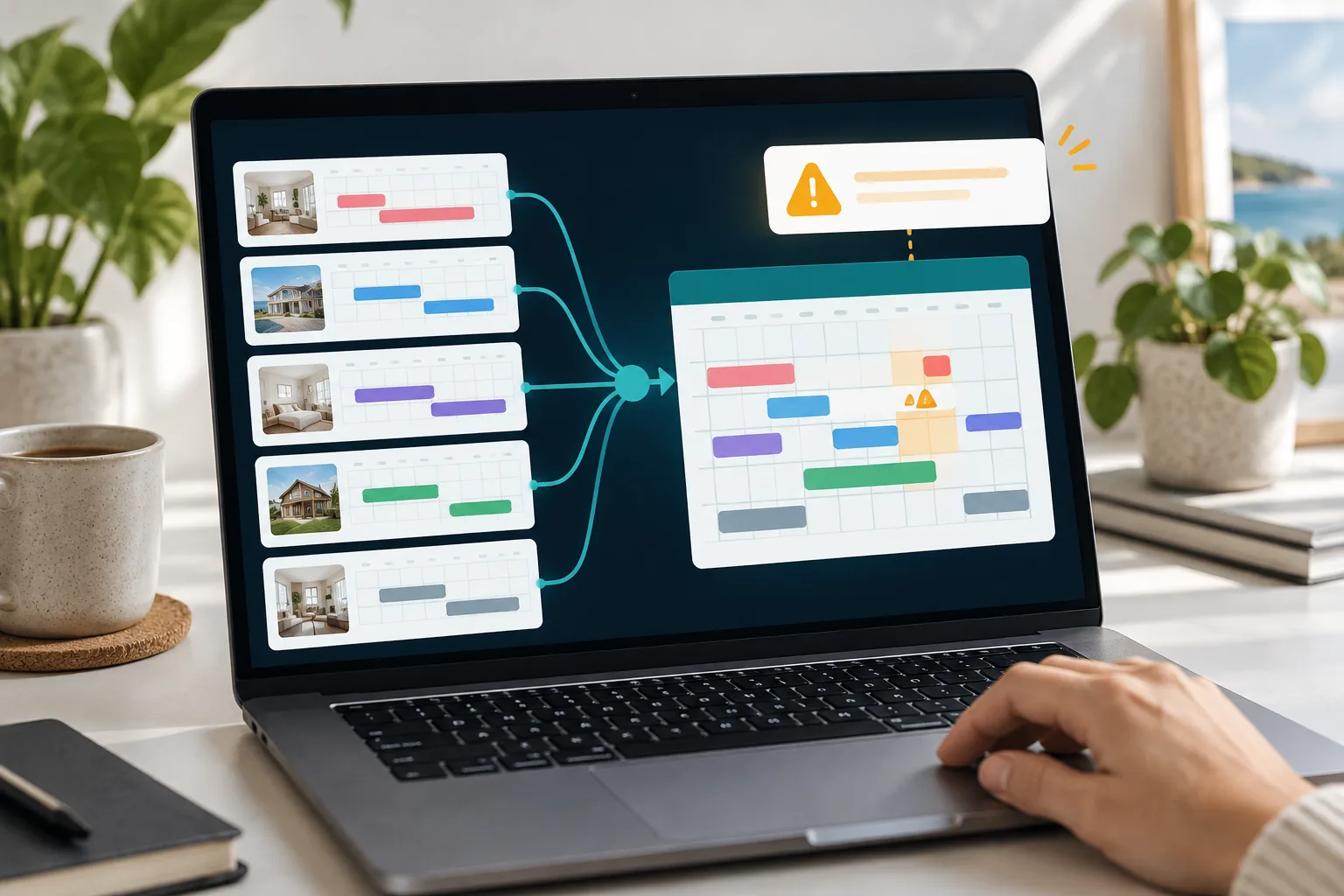
- Use one master calendar for every reservation, owner stay, direct booking and maintenance block.
- iCal is useful for small setups, but it works by polling and can leave a booking race window.
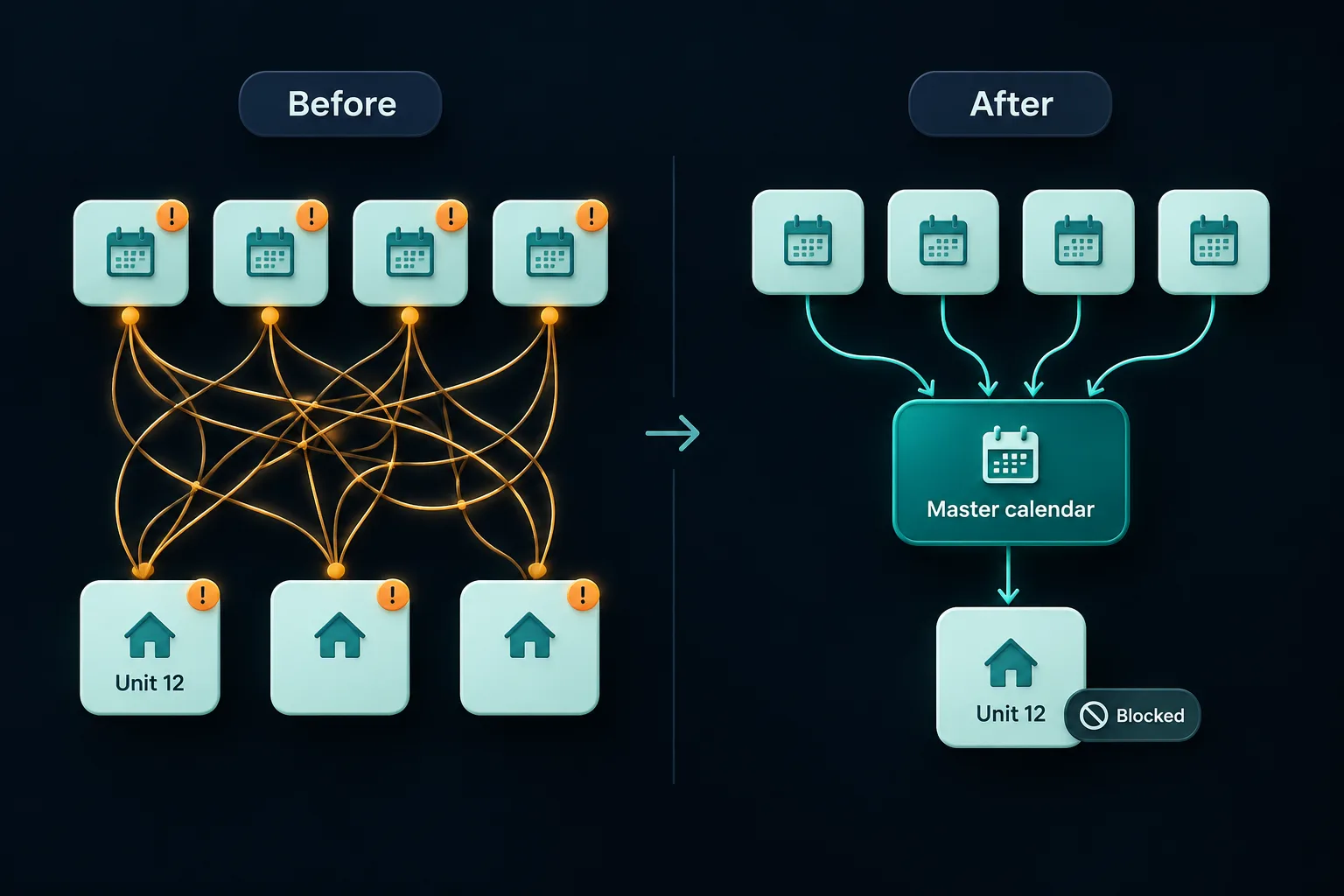
- At portfolio scale, point to point iCal creates too many links to audit safely.
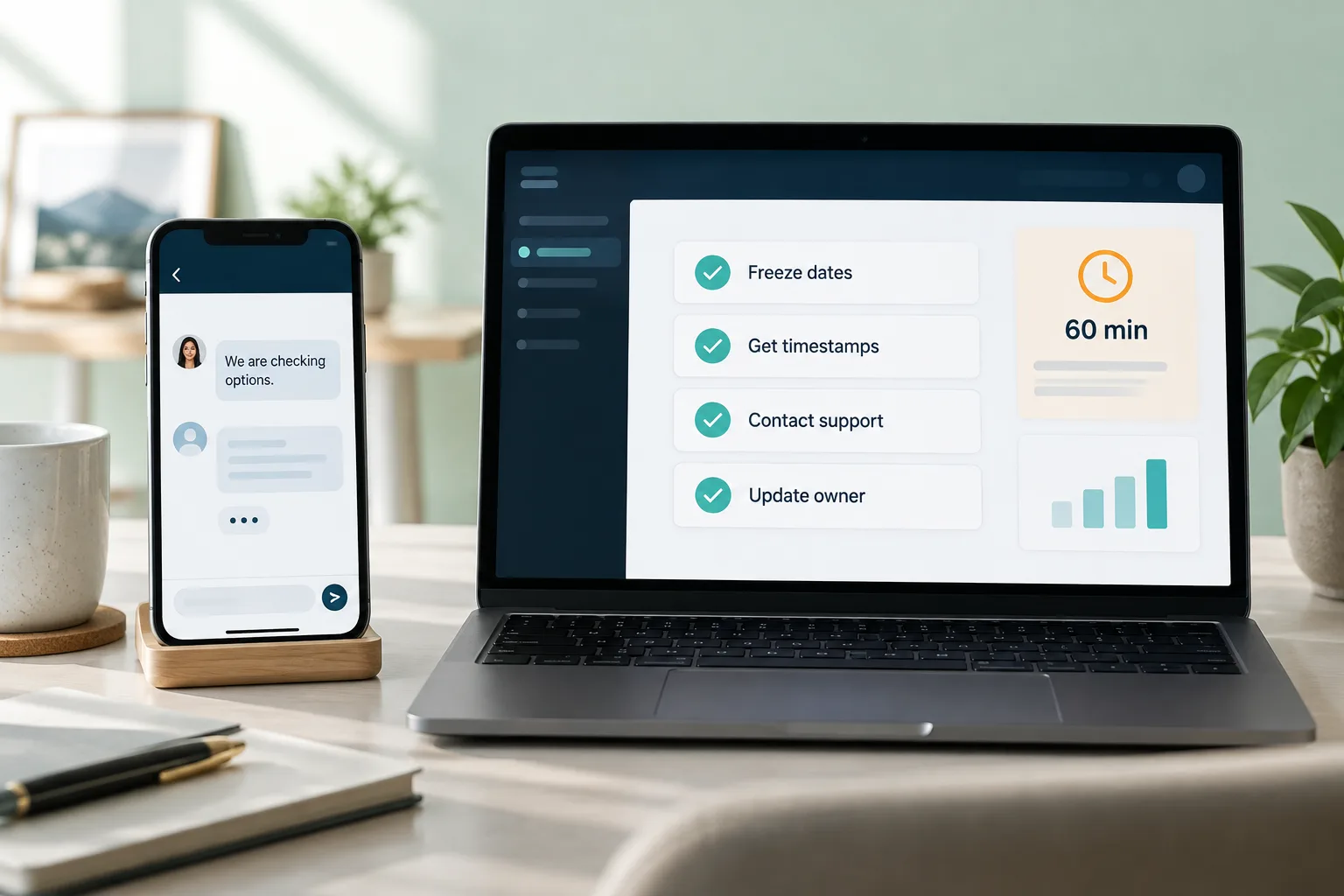
- If a double booking happens, freeze availability first, gather timestamps, then keep all guest and OTA communication inside the platform inbox.
- Permissions, audit logs and daily calendar checks matter as much as the sync method.
If you want to know how to avoid double booking Airbnb, the short answer is this: stop treating Airbnb as the calendar. For a property manager running 5 to 200 short let units for owners, every booking, owner block, maintenance hold, direct reservation and OTA reservation must enter one master calendar first.
An Airbnb double booking usually happens when one channel confirms a stay before another channel has seen the new block. iCal sync can help, but it is delayed by design, so your prevention plan needs systems, permissions and daily controls, not just another calendar link.
What causes double bookings on Airbnb, Booking.com and Vrbo?
A double booking is two confirmed reservations, or one confirmed reservation and one hard block, for the same rentable unit and date range. It may be two guest bookings, a guest booking and an owner stay, or a booking that lands over a maintenance block.
Airbnb protects its own calendar once an Airbnb reservation is confirmed. The cross channel risk starts when the same unit is also sold on Booking.com, Vrbo, Expedia, a direct booking site, over the phone, by WhatsApp, or through an owner request that never reached the booking calendar.
The usual root causes are simple:
- iCal sync delay
- One way calendar sync
- Broken or replaced calendar export links
- Manual owner blocks missed by the team
- Staff reopening dates without checking the source
- Duplicate or overlapping listings
- Booking.com availability reopening after a cancellation
- Instant Book during high demand
- Direct bookings held outside the calendar
Airbnb explains that an imported calendar needs a URL ending in .ics, and that its imported calendars update automatically every 3 hours, with manual refresh subject to request limits. It also warns that some blocked nights from other calendars may or may not block on Airbnb, including preparation time or advance notice settings set elsewhere. See Airbnb guidance on syncing host calendars.
So the race window is real. If Airbnb is booked at 10:02, and another platform last read the Airbnb feed at 10:00, that platform can still sell the same dates before its next successful calendar read.
Free iCal is only free until one assistant, owner text or stale link reopens a sold weekend.
The short answer for property managers
Use one master calendar as the source of truth for every unit. Not one Airbnb calendar, one Booking.com calendar, one owner spreadsheet and one cleaner diary. One master calendar.
The target is clear: when a booking is confirmed anywhere, every other channel should close immediately, or as close to immediately as the connection allows. Every owner block, maintenance hold, direct booking, corporate stay and phone reservation should enter that same calendar before anyone promises availability.
For one or two low volume properties, iCal can be acceptable if you use request to book, avoid last minute booking, and check calendars daily. For 5 to 200 units, iCal becomes a weak operating model because the number of links, staff actions and owner requests grows faster than the team can safely audit.
Move beyond manual iCal if any of these apply:
- You sell on three or more channels
- You manage five or more units
- You use Instant Book
- Owners request personal stays
- You accept direct bookings
- You have same day or event demand
- You have already had a near miss
If you want a working model, study how a single calendar works across your channels before adding more listings.
How iCal sync works and why it lags
An iCal feed is a calendar export URL. It often ends in .ics. One platform exports booked or blocked dates. Another platform imports that URL and reads it periodically.
That last word matters. iCal is usually polling, not push. The importing platform checks later. It is not always told the second a guest books.
Airbnb says its imported calendars update every 3 hours and that you can manually refresh, with limits. It also says Airbnb imports up to 2 years of data from connected calendars. Source: Airbnb calendar import and refresh rules.
What iCal usually carries is limited. It can carry date blocks. It does not normally carry full guest details, payments, messages, rates, restriction rules, cleaning tasks, owner approval notes, or a reason why a date is blocked.
That is why an iCal sync delay is not just a technical nuisance. It creates an operational blind spot. If a Booking.com reservation appears in the feed but Airbnb has not read it yet, Airbnb may still show the dates as open. If a staff member sees that open date and assumes it is safe, the calendar can be sold twice.
iCal versus a single calendar versus API channel management
A single calendar is the operational source of truth. API channel management is the way that source of truth sends availability, rates and restrictions to OTAs faster than basic iCal.
Booking.com says its Rates and Availability API can sync availability in seconds, and also says individual properties connect through a channel manager rather than direct API access. See Booking.com Connectivity Portal.
| Setup | What updates | Speed | Failure mode | Best for | Not enough when |
|---|---|---|---|---|---|
| Manual calendars | Human entered blocks | Only when updated | Someone forgets | One quiet unit | Owners, staff or direct bookings are active |
| Two way iCal | Booked or blocked dates | Platform polling | Delayed read or stale link | One or two units | Instant Book, events or many channels |
| Google Calendar bridge | Display calendar events | Calendar app refresh cycle | Not built for live inventory | Viewing owner dates | Selling live nights |
| PMS master calendar | Reservations, blocks and unit status | System dependent | Wrong mapping or staff override | Growing portfolios | No OTA connection exists |
| API connected channel manager | Availability, rates and restrictions where supported | Often much faster than iCal | Failed push or disconnected listing | Multi channel selling | No one monitors exceptions |
| Direct booking engine connected to PMS | Website bookings into the master calendar | Immediate inside the booking system | Website takes bookings outside stock | Direct sales | Phone and WhatsApp holds are separate |
The clean architecture is hub and spoke. Each unit has one master calendar. Airbnb, Booking.com, Vrbo, Expedia and direct bookings connect to the hub. The hub decides whether the night is available.
The scale problem, why iCal breaks down at 5 to 200 units
Point to point iCal looks harmless on one listing. At portfolio scale, it becomes a maintenance job.
For each property, two channels need 2 links if each platform imports the other. Three channels need 6 links. Four channels need 12 links. That is n times n minus one.
| Units | Channels per unit | Point to point iCal links per unit | Total links to maintain |
|---|---|---|---|
| 10 | 4 | 12 | 120 |
| 20 | 3 | 6 | 120 |
| 20 | 4 | 12 | 240 |
| 50 | 4 | 12 | 600 |
| 200 | 4 | 12 | 2400 |
The danger is silent failure. One expired link, replaced listing, copied wrong URL or archived duplicate can reopen dates without a loud warning.
Common portfolio events create these failures:
- A new owner joins and the old calendar template is copied
- A unit is renamed and staff connect the wrong feed
- A whole home listing overlaps with room listings
- A seasonal listing is reopened
- A Booking.com room type is mapped to the wrong physical unit
- An assistant removes a maintenance block after a contractor message
- An owner stay is sent by text and not approved in the calendar
The cost of free iCal is the audit burden. If nobody owns that burden, nobody owns the risk.
Prevention checklist before each unit goes live
No listing should go live until a second person has verified the calendar across every live channel.
Use this checklist per unit:
- One property ID
- One physical unit inventory record
- One master calendar
- Airbnb, Booking.com, Vrbo, Expedia and direct booking mapped to the right unit
- Test reservation added and checked on every channel
- Test owner block added and checked on every channel
- Test maintenance hold added and checked on every channel
- Preparation time and minimum lead time reviewed
- Same day booking settings reviewed
- Minimum stay, maximum stay and check in day rules reviewed
- Orphan gap rules reviewed
- Rate plan and restriction mapping checked
- Auto reopening behaviour checked after cancellations
- Staff access checked
- Screenshot evidence saved
Overlapping listing checks matter. Look for a whole home listing plus room listings, hotel style room categories plus individual unit listings, duplicate Airbnb listings, seasonal listings, and old listings that were paused rather than closed.
Airbnb has a separate help topic for linking multiple Airbnb listings when, for example, an entire home and a room inside it overlap. See Airbnb related guidance on multiple listing calendars, listed under related articles.
Booking.com is different because room type inventory and rate plans can create overbooking risk if mapping is wrong. Booking.com also says the accommodation must update information daily or more often where required. See Booking.com accommodation obligations.
Daily and weekly calendar controls for managers
Prevention is not a one time setup. It is a routine.
Daily checks:
- New reservations since yesterday
- Owner blocks added or requested
- Maintenance holds added or released
- Same day arrivals
- Next 14 days for high risk units
- Any unmatched OTA reservation
- Any direct booking not in the master calendar
- Any open event night that should be closed
Weekly checks:
- Compare the master calendar with Airbnb, Booking.com and Vrbo for high risk units
- Check any iCal last refresh times where shown
- Inspect newly opened Fridays and Saturdays
- Review event dates, school holidays and peak periods
- Check duplicate or inactive listings
- Check that staff did not reopen blocked dates without a reason
Monthly checks:
- Audit all active listings
- Audit inactive listings and archived duplicates
- Review disconnected channels
- Replace stale iCal links where still used
- Review user permissions
- Review owner block approvals
- Test one booking path from every sales channel
Keep an exception log with unit, dates, channel, discrepancy, owner, staff member, action taken, screenshot link and resolved time. Alerts to ask for include stale sync, failed push, availability reopened, disconnected listing, duplicate confirmation and owner block awaiting approval.
This is also where pricing can create risk. If dynamic pricing opens gap nights but the calendar source is wrong, you are selling bad stock faster. If you use automated pricing, make sure it reads the same source of truth. You can see how YourFrontDesk treats pricing as part of the operating calendar in the pricing engine.
Settings that reduce risk before a booking is made
If you still rely on iCal, reduce the booking race window. Do not leave high demand, same day Instant Book open across several OTAs unless your calendar controls are strong.
Risky settings and safer alternatives:
| Risky setting | Safer operating rule |
|---|---|
| Same day Instant Book across channels | Minimum advance notice on high risk units |
| Owner texts the manager for a stay | Owner request must enter the master calendar before approval |
| Google Calendar as the bridge | Use it only for viewing, not live inventory |
| One way iCal | Two way sync at minimum, with checks |
| All staff can open dates | Only authorised staff can reopen sold or blocked nights |
| Auto reopened availability after cancellation | Review cancellation behaviour and channel settings |
| No reason for date changes | Require a reason code and note before reopening |
Preparation time helps operations, but it is not a substitute for sync. Cleaning buffers reduce tight turnarounds. They do not solve a broken calendar feed.
Role permissions are the unglamorous control that prevents expensive mistakes. Decide who can open dates, who can override a maintenance block, who can approve owner use, and what must be logged before a date is reopened.
For guest communication after booking, consistent messages also reduce manual mistakes. See automated guest messages from booking to review.
What to do in the first hour after a double booking
Do not ask the guest to cancel if you cannot honour the stay. Airbnb says if a host cannot honour a reservation, it is the host responsibility to cancel in time, and the host may not encourage the guest to cancel. Source: Airbnb Host Cancellation Policy for homes.
Minute 0 to 10: freeze availability
- Block affected dates on all channels
- Pause Instant Book on the affected unit if needed
- Block adjacent duplicate listings
- Stop anyone reopening dates until the incident owner approves it
Minute 10 to 20: gather facts
- Reservation IDs
- Confirmed timestamps
- Channel source
- Screenshots of calendars
- Sync logs where available
- Guest message history
- Owner block history
Minute 20 to 30: decide what can be honoured
Use earliest confirmed timestamp, platform policy, arrival date, guest vulnerability, length of stay, relocation stock, owner contract and legal obligations. Do not make the decision based only on which booking pays more.
Minute 30 to 45: contact guest and OTA support
Keep the paper trail inside the platform inbox. If relocation is possible, offer a comparable or better option with clear costs.
Minute 45 to 60: confirm route and owner update
Document the cancellation route, relocation cost, compensation offered, support case number, owner approval and root cause owner.
Worked example: Airbnb booked Friday to Sunday at 10:02 for £900. Vrbo booked the same dates at 10:28 for £950. Airbnb was first and no comparable unit exists. The usual path is to honour Airbnb, freeze all channels, escalate to Vrbo support, cancel through the proper host route if required, offer the Vrbo guest relocation help, and log the root cause as sync delay or mapping failure.
Guest and owner message templates
Hi {first name}, I am very sorry, we have found a confirmed calendar conflict for {property name} on {dates}. This is our responsibility, not yours. We are checking the fastest solution now and will keep everything in this message thread. The options we are working on are {option one} and {option two}. I will update you by {time} and we will support you with the next step.Reservation ID: {reservation ID}
Duplicate reservation ID: {duplicate ID}
Property: {property name}
Dates: {dates}
Confirmed timestamps: {timestamps}
Sync method: {iCal, API, manual, other}
Issue: Two confirmed bookings exist for the same unit and dates. We have frozen availability and contacted the guest in the platform inbox. Please advise the correct cancellation classification and relocation process. Screenshots and logs: {links}Hi {owner name}, we have a double booking incident on {property name} for {dates}. Guest impact is {summary}. Expected cost is {amount or range}. Current action is {action}. Root cause appears to be {root cause}, and the prevention fix is {fix}. I will send a final incident note once the guest outcome is confirmed.Unit: {unit}
Dates: {dates}
Channels: {channels}
Root cause: {root cause}
Guest outcome: {outcome}
Financial impact: {amount}
Policy outcome: {fees or waiver request}
Corrective action: {action}
Owner follow up: {owner note}
Reviewed by: {manager}We are sorry for the disruption to your stay plans. We have reviewed the calendar process for this property and added a stricter availability check so this does not happen again. Thank you for raising it.
Policy consequences on Airbnb, Vrbo and Booking.com
Airbnb does not need a separate Airbnb double booking policy to penalise the issue. Its Host Cancellation Policy says double booking a listing is an example of a host responsible cancellation. Airbnb lists a minimum cancellation fee of $50 USD, with fees of 10 percent more than 30 days before check in, 25 percent between 48 hours and 30 days, and 50 percent within 48 hours or after check in. It also says hosts do not receive a payout for the cancelled reservation, and other consequences can include calendar blocks, account action and loss of Superhost status. Source: Airbnb Host Cancellation Policy for homes.
Vrbo says double booked listings can be subject to enforcement. Its policy lists fees of 25 percent more than 30 days before check in, 50 percent within 30 days but more than 48 hours before check in, and 100 percent within 48 hours or at or after check in. It also lists a $50 USD minimum for hosts paid in USD, no maximum fee, possible listing suspension, calendar blocks, no payout, lower ranking and Premier Host impact. Source: Vrbo Host Cancellations Policy.
Booking.com treats this as overbooking. Its terms say the accommodation should provide a suitable alternative of equal or better standard without extra charge to the guest, promptly inform Booking.com, and may need to reimburse reasonable costs such as alternative accommodation, transport and telephone costs. It also sets response periods of 30 minutes for relocations on the date of or within 24 hours before check in, 2 hours for 24 hours to 7 days before check in, and 24 hours when more than 7 days before check in. Source: Booking.com overbooking and relocation terms.
Example cancellation fee exposure, before relocation or goodwill costs:
| Reservation | Timing | Airbnb fee from policy | Vrbo fee from policy |
|---|---|---|---|
| $900 | 45 days before check in | $90 | $225 |
| $1800 | 10 days before check in | $450 | $900 |
| $2400 | Day before check in | $1200 | $2400 |
Policies change. Check the current platform rule before cancelling.
When iCal is still acceptable and when to upgrade
iCal can work for one owner operated property, two channels, request to book, low occupancy, low last minute demand and daily manual checks. It is not foolish. It is just limited.
Upgrade when you manage five plus units, sell on three plus channels, accept owner stays, run direct bookings, use dynamic pricing, rely on housekeeping automation, have multiple staff, operate in an event market, or have had one near miss.
Look for these controls:
- Airbnb, Booking.com, Vrbo, Expedia and direct booking connections
- One master calendar per unit
- Owner blocks
- Maintenance holds
- Audit log
- Role based permissions
- Sync alerts
- Mobile calendar access
- Restriction sync
- Pricing integration
- Human support for exceptions
YourFrontDesk puts every channel, Airbnb, Booking.com, Expedia, Vrbo and direct, on one calendar with YourFrontDesk in the middle. That does not remove the need for operating discipline, but it gives the team one place to check before availability is shown elsewhere. You can see the setup for hosts and managers at YourFrontDesk for hosts and property managers.
Next steps
Map one unit across every booking path: Airbnb, Booking.com, Vrbo, direct website, phone booking, WhatsApp hold, owner stay and maintenance block. If any path does not close the same master calendar instantly, that is your next double booking risk.
To see the calendar model in action, try the instant demo.
What people ask next
What happens if an Airbnb host double books a guest?
Airbnb may treat the cancellation as host responsible if the host cannot honour the stay. That can mean a cancellation fee, no payout for the cancelled reservation, blocked dates and possible account or Superhost consequences.
Can two guests book the same Airbnb for the same dates?
Two guests should not be able to book the same Airbnb listing for the same dates inside Airbnb. The risk usually comes from the same unit being sold on another platform, a direct booking site, an owner stay, or an overlapping listing that Airbnb does not know about.
Does Airbnb prevent double bookings automatically?
Airbnb blocks its own calendar after an Airbnb booking. It only knows about other channels if they are connected, and iCal connections update on a delay rather than instantly.
How often does Airbnb iCal sync update?
Airbnb says imported calendars automatically update every 3 hours. Hosts can manually refresh connected calendars, but Airbnb also says refresh requests are limited.
Is iCal sync enough to prevent double bookings?
iCal can be enough for one or two low volume properties with careful manual checks. It is usually not enough for a property manager with multiple units, owner blocks, direct bookings, Instant Book and several OTAs.
What should I say to a guest if I have double booked?
Take responsibility, apologise clearly and avoid blaming software. Keep the conversation inside the platform inbox, explain the solution options and give a specific time for the next update.
Do I need a channel manager for Airbnb, Booking.com and Vrbo?
If you manage five or more units, use three or more channels, accept owner stays or take direct bookings, a central calendar or channel manager is usually the safer operating model. iCal may still be useful as a backup, but it should not be the core process.